CSSAny theme
# Painter

> Paint text different colors
> [!NOTE]
> This plugin is looking for maintainers!
> I currently don't have time to fix issues or implement new features, and I don't use the plugin anymore.
> If you'd be interested in maintaining it, open an issue!
> Thanks!


Inspired by my [css snippet & data.json](https://github.com/chetachiezikeuzor/Highlightr-Plugin/issues/61) to use Highlightr to change text color.
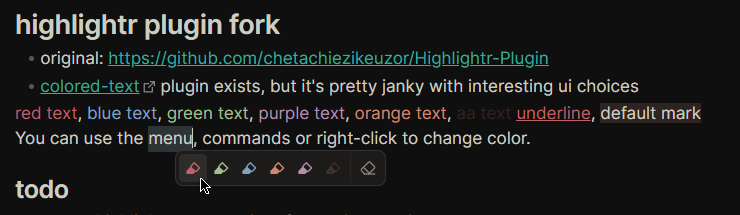
The aim of this plugin is to support most features of [Highlightr-Plugin](https://github.com/chetachiezikeuzor/Highlightr-Plugin) as well as changing of the text color.
## Improvements over original plugin
### New features
- Added `text-color` higlight option
- Added `minimal` menu style - only show icons in one line (with `title` attributes)
- Smarter selection (adapted from [Smarter MD Hotkeys](https://github.com/chrisgrieser/obsidian-smarter-md-hotkeys))
- `Inline code` signifies the part of the text being selected. `|` is a cursor without selection.
- **Auto-select word:** "hello t`|`here world!" => "hello `there` world!"
- **Trim selection to nearest word:** "what` is` up?" => "what `is` up?"
- You are still able to paint a certain part of a word: "h`ell`o" => "h`ell`o"
- Better `Clear` (formerly `Remove higlight`) command
- Added it to the highlighting menu as well
- In settings, you can configure custom CSS selectors to remove alongside any `mark` elements
- Replaced regex-based approach with a `DOMParser`
- New svg icon (modified lucide highlighter icon)
- Added dynamic highlight preview in settings (shows with your colors)
### Fixes
- [Works in Obsidian's Table editor](https://github.com/chetachiezikeuzor/Highlightr-Plugin/issues/90)
- [Removed extra spaces after marks](https://github.com/chetachiezikeuzor/Highlightr-Plugin/pull/40)
- Allows overwriting previous highlights (setting) - similar to this [pull request](https://github.com/chetachiezikeuzor/Highlightr-Plugin/pull/63)
- Highlightr styles now use css variables instead of hardcoded values
### Other
- Cleaned up file structure & move to esbuild instead of rollup
- Removed a bunch of unnecessary code & styles, overall cleanup & rewrite
- Removed a bunch of custom icons in favor of normal obsidian icons
- Removed `wait()` calls (promise + settimeout)
- Removed dependencies:
- `pickr` - Replaced with obsidian's native color picker & an alpha slider
- Renamed command ids for consistency
- Rewrote basically the entire plugin lol
- added `"use strict"` to minified code to improve performance
## Support plugin development
If you find this Plugin helpful, consider it's further development or just say a small thank you
[](https://liberapay.com/KraXen72) [](https://ko-fi.com/kraxen72)
## Migrating from highlightr
If you've previously used the highlightr plugin, you can migrate your settings by copying:
- `<vault>/.obsidian/plugins/highlightr-plugin/data.json` =>
- `<vault>/.obsidian/plugins/painter/data.json`
Then, disable & enable the Painter plugin.
Make sure to check settings have sucessfully migrated, and if they have, feel free to uninstall highlightr.
## css-classes vs. inline-styles: which should you choose?
The settings allow you to select between two highlight styles, `css-classes` and `inline-styles`.
Here is their comparison:
### css-classes
- Uses `<mark class="hltr-colorname">content</mark>`
- Painter plugin injects a stylesheet which colors these
- 👍 More flexible:
- Re-defining a color with the same name will update existing highlights
- Changing the highlight style will update all existing highlights as well
Unless you plan on frequently exporting your notes outside of obsidian, use Obsidian Publish or edit notes in externally, pick this option. It's much more flexible.
Even if you plan to someday export your notes, you can always write a simple script to convert the `<mark>` elements to whatever you want, or add a custom stylesheet that will add back their coloring.
In a future plugin release, there will likely be an option to generate this stylesheet for usage outside of obsidian.
### inline-styles
- uses `<mark style="color:#hex">content</mark>` or `<mark style="background-color:#hex">content</mark>`
- still dependent on obsidian/external stylesheets for any other styling, like rounded corners, padding, etc.
- bakes the color in the highlight: if you change a color in settings, previous highlights will stay the same
- changing highlight style later will not fully affect existing highlights
- `background-color` highlights will not turn into `color` (`text-color` in settings) and vice versa.
- slightly easier to use outside of obsidian
Some people might prefer this method, so i kept it in.
Feel free to experiment with them to find the one best for your use-case.
## i can't see the color previews in context menu

If your context menu looks like this and not like the one in the screenshots above, in Obsidian settings, `Appearance` > `Advanced`, turn off `Native menus`.
## Credits
- [Highlightr-Plugin](https://github.com/chetachiezikeuzor/Highlightr-Plugin) released under [MPLv2](./LICENSE) license. support: [ko-fi](https://ko-fi.com/chetachi)
- for most of the original source code (most has been rewritten)
- [Smarter MD Hotkeys](https://github.com/chrisgrieser/obsidian-smarter-md-hotkeys) released under [MIT](https://github.com/chrisgrieser/obsidian-smarter-md-hotkeys/blob/master/LICENSE) license. support: [ko-fi](https://ko-fi.com/pseudometa)
- for smart text modification logic
## What this plugin doesen't try to be
This plugin is for coloring/highlighting text.
It doesen't try to provide a comprehensive formatting toolbar/experience.
Out of scope: [Modal highlighting (highlighting brushes)](https://github.com/chetachiezikeuzor/Highlightr-Plugin/issues/82)
Use this: [obsidian-editing-toolbar](https://github.com/PKM-er/obsidian-editing-toolbar)
How to Install
- Download the CSS file below
- Move it to your vault's
.obsidian/snippets/folder - Open Obsidian → Settings → Appearance → CSS Snippets → Enable it
Stats
Stars
47
Forks
1
License
MPL-2.0
Last updated 6mo ago