Command Center AI Eternal Context Engine
▎Eternal memory for any AI — local, private, portable. Fixes context drift and compaction permanently. Works with Claude, GPT, Gemini, Grok, Cursor, Zed and any MCP-compatible AI.

Eternal Memory for Any AI — Local, Private, Portable
Eternal Context Engine (ECE)






Your AI shouldn't start from scratch every session. Command Center gives any AI tool permanent, searchable memory stored as Markdown files you can read, edit, and browse in Obsidian.
Works with: Claude Desktop, Claude Code, Cursor, Zed, Gemini CLI, Custom AI, or any MCP-compatible AI.
No cloud. No subscriptions. No lock-in. Your context lives on your machine — or on a USB drive.
The Problem: The Longer the Conversation, the Worse the AI Gets
Every AI has this problem — Claude, GPT, Gemini, Grok, Codex, all of them. The longer a conversation runs, the more the model degrades. It forgets decisions. It contradicts itself. It loses track of your architecture, your constraints, what you already ruled out. The hallucinations get more frequent, not less. You spend more time correcting than building.
When the conversation gets long enough, the provider compacts it — silently replacing your entire history with a summary. Suddenly your AI has no idea what you were building or why.
Understanding why this happens — what compaction actually is, what gets lost and why the AI can't tell — is covered in full in Bootstrap — Surviving Compaction.
Command Center was built to fix this permanently. Your context lives in your vault, not in the conversation. The AI is always grounded to what's actually true — regardless of how long the conversation runs, how many times it compacts, or which AI you're using. No re-explaining. No re-hallucinating. No momentum lost.
What It Does
Your Notes (Markdown)  →  Vault (Obsidian Graph View)
         ↓
    Engine indexes with LanceDB (local vector DB)
         ↓
  MCP Server / REST API  →  Any AI on your machine or network
         ↓
  AI remembers you. Every session. Across machines.
- Write notes in Markdown → Engine indexes them automatically
- AI searches your vault via MCP or REST API — gets relevant context instantly
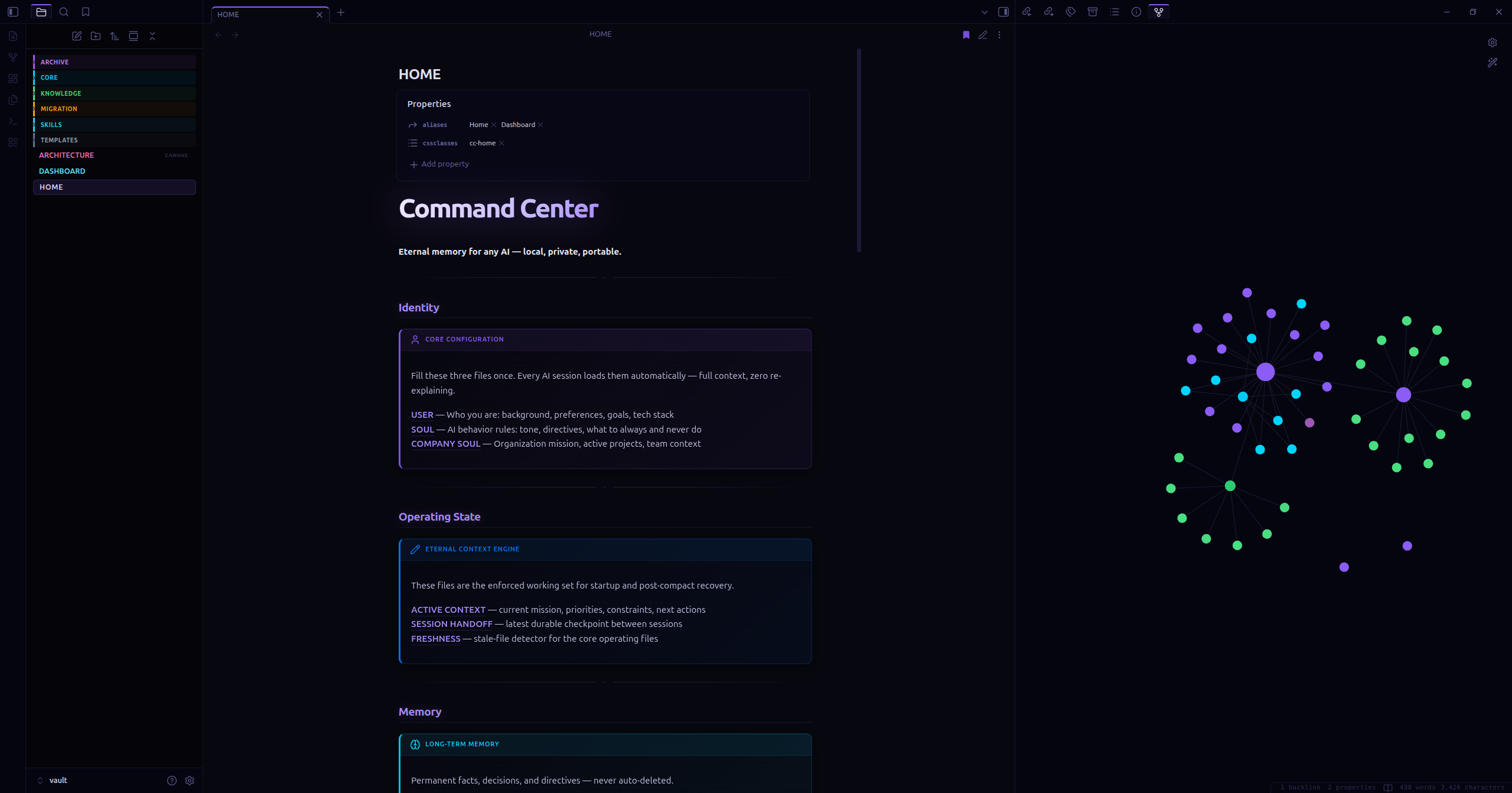
- Visualize your knowledge in Obsidian's Graph View as it grows
- Migrate in 60 seconds — copy folder, reinstall deps, reindex
- Multi-agent ready — shared vault for all agents, private namespaces per agent. Claude, Grok, Gemini, and any other AI can run simultaneously off the same vault without stepping on each other's memory
Quick Start
# 1. Clone
git clone https://github.com/KCommader/Command-Center-AI-Eternal-Context-Engine
cd Command-Center-AI

# 2. Setup (creates venv, installs deps, scaffolds vault)
bash setup.sh

# 3. Fill in your identity
# Edit: vault/Core/USER.md, vault/Core/SOUL.md, vault/Core/COMPANY-SOUL.md

# 4. Start the engine
python engine/omniscience.py start

# 5. Connect your AI (see below)
One-command setup — writes the right MCP config for your AI runtime automatically:
python engine/omniscience.py setup-ai claude-code      # Claude Code
python engine/omniscience.py setup-ai claude-desktop   # Claude Desktop
python engine/omniscience.py setup-ai cursor           # Cursor
python engine/omniscience.py setup-ai zed              # Zed
After setup-ai, your AI reads CLAUDE.md at startup and calls bootstrap_agent(reason="session_start") automatically. Compaction becomes a non-event.
Manual MCP config snippets are in Connecting Your AI below.
Connecting Your AI
Option A — MCP (Recommended for Claude, Cursor, Zed)
MCP is Anthropic's open protocol. Any MCP-compatible AI gets your vault as tools + resources automatically.
Claude Desktop (~/.config/claude/claude_desktop_config.json):
{
  "mcpServers": {
    "command-center": {
      "command": "python",
      "args": ["/absolute/path/to/Command-Center-AI/engine/mcp_server.py"],
      "env": {
        "OMNI_VAULT_PATH": "/absolute/path/to/Command-Center-AI/vault",
        "OMNI_ENGINE_URL": "http://127.0.0.1:8765"
      }
    }
  }
}
Claude Code (.claude/mcp_config.json in your project):
{
  "mcpServers": {
    "command-center": {
      "command": "python",
      "args": ["/absolute/path/to/Command-Center-AI/engine/mcp_server.py"]
    }
  }
}
Once connected, the AI gets these tools automatically:
search_memory— semantic search across your vaultstore— save facts/decisions (engine auto-classifies into the right memory tier)read_vault_file— read any vault documentlist_vault— browse available noteslist_skills— list all skills available in the vaultread_skill— load a specific skill prompt on demandresolve_skills— auto-detect which skills are relevant to the current taskbootstrap_agent— recover full context after provider compaction (see Bootstrap section)update_working_set— pin the files and context most relevant to active workrecord_handoff— write a durable session summary before ending a sessionverify_vault_file— confirm a vault file exists and is readablefreshness_report— show when each core context file was last updatedsync_skills— sync vault skills to any connected AI runtime (Claude, Gemini, Codex)
Option B — Network MCP via HTTP (NAS / Multi-Machine)
Why this exists: stdio requires the MCP server to run on the same machine as the AI. If you have a NAS or home server, run one Command Center instance and connect every machine on your network to the same vault. One memory. Shared everywhere.
On your NAS/server:
# Start the engine
python engine/omniscience.py start

# Start the MCP HTTP server (managed background process)
python engine/omniscience.py mcp-start --key your_secret_token
Generate the client config automatically:
python engine/omniscience.py setup-ai --http YOUR_NAS_IP
This prints the exact JSON to paste into any AI client. If OMNI_MCP_KEY is set, the Bearer token appears in the snippet automatically.
Or configure manually (~/.claude/settings.json):
{
  "mcpServers": {
    "command-center": {
      "url": "http://YOUR_NAS_IP:8766/mcp",
      "headers": { "Authorization": "Bearer your_secret_token" }
    }
  }
}
HTTPS — use Caddy or nginx as a reverse proxy for automatic TLS:
myvault.yourdomain.com {
  reverse_proxy localhost:8766
}
Then update your AI config URL to https://myvault.yourdomain.com/mcp.
Security: The engine already has role-based Bearer tokens (read/write/admin). Add
--keyfor the MCP HTTP layer too. Keep the engine onlocalhost— only the MCP server needs to be LAN-accessible.
Option C — REST API (For scripts and bots)
# Start engine
python engine/omniscience.py start

# Search your vault
curl -X POST "http://127.0.0.1:8765/search" \
  -H "Content-Type: application/json" \
  -d '{"query": "my trading strategy", "k": 5}'

# Store a memory
curl -X POST "http://127.0.0.1:8765/capture" \
  -H "Content-Type: application/json" \
  -d '{"content": "User prefers Python over Node for data pipelines"}'
Vault Structure
vault/
├── Core/
│   ├── USER.md          ← Who you are (fill this in)
│   ├── SOUL.md          ← AI identity & behavior rules (fill this in)
│   └── COMPANY-SOUL.md  ← Organization/project mission (fill this in)
├── Knowledge/           ← Your domain notes (strategies, docs, research)
└── Archive/
    └── MEMORY.md        ← Auto-captured facts and decisions
The three Core files are your foundation. Fill them in once and every AI session starts with full context.
Bootstrap — Surviving Compaction
What compaction actually is
Every AI runs on a context window — a hard limit on how much text the model can hold in working memory at once. Claude's is 200,000 tokens. GPT-4's is 128,000. When a long conversation approaches that limit, the provider has a problem: there's no more room.
So they compact. The provider takes your entire conversation history and replaces it with a summary — automatically, silently, without asking. The specific code you shared becomes "user shared some code." The architecture decision you locked in becomes "user discussed project structure." The constraint you set becomes "user mentioned some requirements."
The AI doesn't know what was lost. It works from the summary as if it were the full picture — and fills the gaps with hallucination. That's why it suddenly contradicts decisions you made earlier, suggests approaches you already ruled out, or acts like it's meeting your project for the first time. It's not malfunctioning. It literally no longer has access to what you said.
Bootstrap solves this by giving the AI a source of truth that lives outside the conversation:
bootstrap_agent(reason="session_start")
The engine reads your Core identity files, your active session handoff, and your working set — then hands the AI everything it needs to resume. Not a summary of a summary. The actual files you wrote.
Automatic wiring — setup-ai writes CLAUDE.md into your project, which Claude Code reads at startup and calls bootstrap automatically. For other runtimes, add this to your system prompt or session opener:
At the start of every session: call bootstrap_agent(reason="session_start") before anything else.
The three state files bootstrap reads — updated by your AI throughout each session:
vault/Core/SESSION_HANDOFF.md— what was just done, what comes nextvault/Core/ACTIVE_CONTEXT.md— current working set and project statevault/Core/FRESHNESS.md— timestamp snapshot of when each file was last updated
Call record_handoff at the end of any meaningful session. Call bootstrap_agent at the start of the next one.
Configuration
All settings live in vault/config.yaml — a human-readable file that ships pre-configured with sensible defaults. Open it in any text editor or directly in Obsidian.
embedding:
  # ── Pick the tier that fits your hardware ──────────────────────────────────
  #  LIGHT     ~90MB   384-dim  EN only    BAAI/bge-small-en-v1.5
  #              Raspberry Pi, low-RAM servers, fastest cold start
  #
  #  DEFAULT   ~130MB  384-dim  50+ langs  sentence-transformers/paraphrase-multilingual-MiniLM-L12-v2
  #              Recommended starting point. Works on any modern laptop.
  #
  #  BALANCED  ~270MB  384-dim  100+ langs intfloat/multilingual-e5-small
  #              Better recall, still fine on 4GB RAM machines.
  #
  #  POWER     ~570MB  1024-dim 100+ langs BAAI/bge-m3  ← recommended upgrade
  #              Best quality/size ratio. 8192-token context. BM25+dense+colbert.
  #              Requires ~6GB RAM. After switching: python engine/omniscience.py reindex
  #
  #  POWER+    ~2.4GB  1024-dim 100+ langs Qwen/Qwen3-Embedding-0.6B
  #              Next-gen: MTEB multilingual competitive with bge-m3 at similar size.
  #              Instruction-aware, 32K context, MRL (flexible dims). Requires 8GB+ RAM.
  #
  #  NOTE: Alibaba-NLP/gte-multilingual-base (old POWER tier) has a confirmed
  #  RoPE position_ids memory corruption bug on PyTorch 2.10+ CPU — do not use.
  #  bge-m3 is the drop-in replacement with better benchmark scores.
  #
  model: sentence-transformers/paraphrase-multilingual-MiniLM-L12-v2  # DEFAULT — change to your tier

search:
  mode: balanced          # strict | balanced | exploratory
  bm25_enabled: true      # keyword search alongside vector
  rerank_enabled: true    # CrossEncoder reranking
  query_expansion: true   # expand queries with vault vocabulary

chunking:
  max_chars: 1500
  min_chars: 80

memory:
  classifier_mode: regex  # regex | llm | hybrid
  store_rate_limit: 30    # writes per minute per agent
  store_dedup_threshold: 0.92

privacy:
  private_namespaces:
    - local_only           # vault/Local/ — never shown to cloud AIs
Environment variables (OMNI_*) always override config.yaml. The YAML file is the human layer; env vars are for automation, Docker, and CI.
Embedding Models — How They Work and Why We Chose These
Embedding models are the neural networks that convert your vault files into numeric vectors — fixed-length arrays of floats that encode semantic meaning. When you run a search, your query gets embedded the same way, and the engine finds vault content whose vector is geometrically closest to it. The quality of those vectors directly determines whether "what did we decide about the database schema" surfaces the right notes or noisy irrelevant ones.
All models run 100% locally — your text never leaves your machine. No API keys, no cloud calls, no data exposure.
How to choose your tier:
The tiers are a quality/resource trade-off. All models in the same dimensional class use the same LanceDB schema — the engine detects dimension changes automatically at startup and rebuilds the index if needed, so switching is one config line and one reindex command (python engine/omniscience.py reindex).
The DEFAULT tier (paraphrase-multilingual-MiniLM-L12-v2, ~130MB, 384-dim) runs on anything with 2GB RAM. It covers 50+ languages and is the safe starting point — fast cold starts, low memory pressure, good enough for most personal vaults.
The POWER tier (BAAI/bge-m3, ~570MB, 1024-dim) is the recommended upgrade for anyone doing serious work. bge-m3 is a hybrid retrieval model that runs three retrieval methods simultaneously — dense vector search, sparse BM25-style keyword matching, and ColBERT late interaction — in a single inference pass. The 1024-dimensional vectors capture substantially more semantic nuance than 384-dim models, the context window extends to 8192 tokens (vs 512 for MiniLM), and it covers 100+ languages with strong multilingual recall. MTEB Multilingual nDCG@10 score: 0.674. For a vault that accumulates months of decisions, architecture notes, and code context, the improvement in recall precision is meaningful.
The POWER+ tier (Qwen/Qwen3-Embedding-0.6B, ~2.4GB, 1024-dim) is the cutting edge for local-only setups with 8GB+ RAM. Released April 2026, the Qwen3 Embedding series introduces instruction-aware embeddings — you can prepend a task description to tell the model whether it's indexing a code snippet, a meeting note, or a decision log, and it adjusts the embedding accordingly. It also supports Matryoshka Representation Learning (MRL), meaning you can truncate vectors to any smaller dimension at query time for faster approximate searches without reindexing. The 32K token context window handles documents that would chunk poorly at 8192 tokens. Benchmark-wise the 0.6B variant is competitive with bge-m3 at the same dimensionality; the 4B and 8B variants rank first on MTEB Multilingual (70.58).
Why Alibaba GTE was removed:
Alibaba-NLP/gte-multilingual-base was the original POWER tier recommendation. It was removed after a confirmed upstream bug: on PyTorch 2.10+ CPU, the model's RoPE (Rotary Position Embedding) implementation corrupts the position_ids tensor during inference. The bug produces silently wrong embeddings — the model runs without errors, vectors look reasonable in shape, but positional information is scrambled, degrading retrieval quality in ways that are hard to diagnose. bge-m3 is the drop-in replacement: same dimensionality, better benchmark scores, no known bugs. The GTE bug is documented in the engine source (engine/engine.py) for future reference.
Privacy & Safety
Command Center is built around a simple principle: your data, your rules.
Private Namespaces — Local LLM Isolation
Files in vault/Local/ are automatically namespaced as local_only and excluded from all default searches. Cloud AIs (Claude, GPT, Gemini via API) never see them unless they explicitly request the namespace.
This is designed for setups where local LLMs (Ollama, LM Studio, local Grok) handle private tasks — personal journals, health data, financial planning — while cloud AIs handle coding and general work. Same vault, complete isolation.
Add your own private zones via environment variable:
# Everything in vault/Local/, vault/Diary/, vault/Medical/ becomes invisible to cloud AIs
export OMNI_PRIVATE_NAMESPACES=local_only,diary,medical
Store Protection — Rate Limiting & Deduplication
Two safeguards prevent AI agents from polluting your vault:
- Rate limiter: max 30 writes per minute per agent (configurable via
OMNI_STORE_RATE_LIMIT). If an AI goes rogue and tries to flood your vault, it gets throttled automatically. - Dedup check: before writing, the engine checks if near-identical content already exists (>92% similarity). Duplicates are skipped and the AI gets a
"duplicate_skipped"response. Keeps your vault clean across sessions. Configurable viaOMNI_STORE_DEDUP_THRESHOLD.
Deployment
Manual (default)
# Engine
python engine/omniscience.py start --vault ./vault   # Start in background
python engine/omniscience.py status                   # Check status
python engine/omniscience.py logs --lines 50          # View logs
python engine/omniscience.py stop                     # Stop
python engine/omniscience.py doctor                   # Health check

# MCP HTTP server (for NAS / network access)
python engine/omniscience.py mcp-start               # Start MCP server (port 8766)
python engine/omniscience.py mcp-status               # Check MCP server
python engine/omniscience.py mcp-stop                 # Stop MCP server

# Sentinel (auto-restarts engine on crash)
python engine/omniscience.py sentinel-start           # Start sentinel
python engine/omniscience.py sentinel-status           # Check sentinel
python engine/omniscience.py sentinel-stop             # Stop sentinel

# Backup
python engine/omniscience.py backup                    # Snapshot vault + index
Docker
docker compose up -d              # Start engine + vault watcher
docker compose logs -f             # Watch logs
docker compose down                # Stop
Your vault and LanceDB index are bind-mounted from the host — nothing lives inside the container. Delete the container, your data is untouched.
systemd (Native Linux)
# Install the service (copies unit file, enables, starts)
bash setup.sh --install-service

# Or manually:
sudo cp engine/command-center.service /etc/systemd/system/
sudo systemctl daemon-reload
sudo systemctl enable command-center
sudo systemctl start command-center

# Watch logs
journalctl -u command-center -f
Engine starts on boot, restarts on crash, logs to journald. No Docker overhead — native process management.
Windows
ECE runs on Windows via PowerShell. Two differences:
- Use
;instead of&&for command chaining (cd engine ; python omniscience.py start) - Use
python3or the full venv path ifpythonresolves to the Windows Store stub
All other commands work identically. Docker is the recommended path on Windows for production use.
Architecture
| Component | Why | What |
|---|---|---|
vault/ | Human-readable, Obsidian-native | Markdown source of truth |
engine/engine.py | One process for index + API | Watches vault, embeds, serves search |
engine/memory_classifier.py | Auto memory routing | Rule-based tier classifier — no LLM needed, ~1ms |
.lancedb/ | Fast local vector search | Like SQLite but for vectors — auto-built, never touch manually |
engine/mcp_server.py | Universal AI connector | MCP protocol, two transports: stdio (local) + HTTP (network) |
engine/omniscience.py | App-like UX | start/stop/status/doctor/logs/mcp-start/mcp-stop/sentinel-start/sync-skills/setup-ai/backup |
engine/nightly_maintenance.py | Anti-bloat | Cache purge + short-term TTL expiry + health check |
engine/context_state.py | Anti-compaction | Reads/writes SESSION_HANDOFF, ACTIVE_CONTEXT, FRESHNESS — bootstrap recovery packet |
engine/skill_adapter.py | Universal skills | Syncs vault/Skills/ to Claude, Gemini, Codex, Custom AI native formats |
engine/sentinel.py | Engine resilience | Monitors /health, auto-restarts the engine on crash or timeout |
engine/config.py | Human-readable config | Reads vault/config.yaml, maps to OMNI_* env vars — YAML defaults, env vars override |
engine/__version__.py | Single version source | One file, one version number — used by engine, MCP server, and API responses |
Key design decisions:
-
Markdown is the source of truth — all memory lives in
.mdfiles you can read, edit, and open in Obsidian. LanceDB is the auto-generated search index, never the source. -
The AI never picks the memory tier —
memory_classifier.pydoes it based on content patterns. Keeps memory clean without requiring the AI to make judgment calls. -
Vault is air-gapped — engine only listens on
127.0.0.1. Nothing from the internet reaches your memory directly. Even browser automation results flow through you before anything gets stored. -
Role-based auth — separate Bearer tokens for read/write/admin. Give each agent only the access it needs.
-
Two MCP transports — stdio spawns the server locally (zero config, works instantly). Streamable HTTP runs the server on a NAS and serves any machine on your LAN from one vault.
-
Embedding model: configurable via
config.yaml— ships withparaphrase-multilingual-MiniLM-L12-v2as the safe default; upgrade toBAAI/bge-m3(POWER tier, 1024-dim, 100+ langs, recommended) orQwen/Qwen3-Embedding-0.6B(POWER+ tier, instruction-aware, 32K context, MRL); all models run 100% local. Changing model requirespython engine/omniscience.py reindex. -
Vector DB: LanceDB — embedded, disk-based, no server needed
-
API: FastAPI on
localhost:8765 -
MCP transports: stdio (local, zero-config) + Streamable HTTP (NAS/network, Bearer auth)
Skills — Universal Across All AIs
Skills are Markdown prompt libraries that live in vault/Skills/. Any connected AI can load them on demand — and the skill adapter syncs them to each AI's native format automatically.
vault/Skills/          →  ~/.claude/skills/         (Claude Code)
                       →  ~/.gemini/skills/          (Gemini CLI)
                       →  ~/.codex/skills/           (Codex)
                       →  workspace/skills/*/SKILL.md (Custom AI)
# Sync all vault skills to every connected runtime
python engine/omniscience.py sync-skills

# Sync to a specific runtime only
python engine/omniscience.py sync-skills --runtime claude

# Preview without writing
python engine/omniscience.py sync-skills --dry-run
Or via MCP: sync_skills({ "runtimes": ["claude", "gemini"] })
Writing a skill — drop a .md file in vault/Skills/ with this frontmatter:
---
type: skill
trigger: my-skill-name
description: What this skill does
targets: [claude, gemini, codex]
---

# My Skill
... the prompt content the AI loads ...
The vault is the source of truth. Runtimes are output targets, never edited directly.
Migrating to a New Machine
# 1. Copy the entire Command-Center-AI folder (vault/ included)
# 2. On new machine:
bash setup.sh
python engine/omniscience.py start
# Done. LanceDB rebuilds from Markdown in seconds.
Or put it on a USB drive. Runs anywhere Python runs.
Memory Tiers — How Storage Works
Command Center stores memory in three tiers automatically. You never classify manually — the engine's classifier reads the content and decides.
| Tier | Location | TTL | What goes here |
|---|---|---|---|
| cache | vault/Cache/session-YYYY-MM-DD.md | Cleared nightly | Greetings, one-off questions, session noise |
| short_term | vault/Archive/short/YYYY-MM-DD.md | 30 days | Active tasks, project state, in-progress work |
| long_term | vault/Archive/MEMORY.md | Never expires | Preferences, decisions, identity rules, directives |
How classification works (engine/memory_classifier.py):
- Force keywords override everything:
"remember this","never forget","permanent"→ always long_term - Pattern matching scores content across all three tiers
- Long-term signals:
always,never,decided,from now on,my wallet,tech stack - Short-term signals:
working on,current task,blocked,this sprint,backtest result - Cache signals: greetings,
just checking,show me,today - Longest match wins; no signal defaults to short_term (better to keep than lose)
- Very short content (<4 words) → cache; long structured content (>30 words, 3+ sentences) → boosts long_term
The AI calls store("content") — classifier routes it. That's the whole interface.
Nightly Maintenance
Auto-cleanup and health checks every night (prevents memory bloat):
chmod +x engine/install_nightly_timer.sh
bash engine/install_nightly_timer.sh
What it does:
- Engine health check — runs
doctorto verify vault + index are healthy - Admin cleanup — calls engine's
/admin/cleanupendpoint if engine is running - Cache purge — deletes all files in
vault/Cache/(session noise, not worth keeping) - Short-term expiry — removes files in
vault/Archive/short/older than 30 days (configurable via--short-term-ttl) - Freshness snapshot — updates
vault/Core/FRESHNESS.mdso bootstrap always knows current state - Logs everything to
.omniscience/nightly.log
API Reference
| Endpoint | Method | Description |
|---|---|---|
/health | GET | Engine status and vault stats |
/search | POST | Semantic search with optional namespace filter |
/capture | POST | Store a memory entry |
/admin/reindex | POST | Force full reindex (admin key required) |
/admin/cleanup | POST | Run cleanup (admin key required) |
Auth (Optional)
export OMNI_API_KEY="your-secret-token"

curl -H "Authorization: Bearer $OMNI_API_KEY" ...
For LAN/network use, split read/write/admin tokens:
export OMNI_API_KEYS_READ="read_token"
export OMNI_API_KEYS_WRITE="write_token"
export OMNI_API_KEYS_ADMIN="admin_token"
Testing
# Install test dependencies
pip install -r tests/requirements-test.txt

# Run all tests
pytest tests/

# Run specific test files
pytest tests/test_chunker.py       # Markdown chunker
pytest tests/test_classifier.py    # Memory tier classifier
pytest tests/test_search.py        # Search pipeline (integration)
pytest tests/test_smoke.py         # Full pipeline lifecycle
Tests use a temporary vault and temporary LanceDB — nothing touches your real data. The smoke test runs the complete lifecycle (index → search → capture → dedup → grounding) in one pass.
Scripts
scripts/ contains standalone tools and examples that work alongside the engine but aren't part of the core memory system.
-
scripts/browser_test.py— Example of usingbrowser-usewith the Anthropic API to give your AI a real browser. The AI can navigate pages, extract data, and fill forms. Results are returned to you — nothing is stored in the vault automatically (prompt injection protection).ANTHROPIC_API_KEY=your_key .venv/bin/python scripts/browser_test.pySwap the task string for anything: check prices, read dashboards, monitor pages. Uses Claude Haiku by default (cheapest). Change to
claude-sonnet-4-6orclaude-opus-4-6for harder tasks.
Add your own scripts here. Keep personal/sensitive scripts in subdirectories listed in
.gitignore.
Obsidian — The Intended Interface
Install Obsidian (free), open the vault/ folder as a vault. Not the repo root — the vault/ subfolder.
The repo ships a complete .obsidian/ config inside vault/ with everything pre-wired:
| What's included | What it does |
|---|---|
HOME.md | Dashboard landing page — live memory stats via Dataview, quick links to all core files |
ARCHITECTURE.canvas | Visual diagram of the full system: vault → engine → MCP → AI tools |
snippets/command-center.css | Electric blue accent (#00d4ff), custom callout types per memory tier, Dataview table polish |
graph.json | Color groups tuned for the vault: Core=blue, Archive=purple, Knowledge=green |
bookmarks.json | HOME.md and ARCHITECTURE.canvas pinned in the sidebar |
Templates/ | Note templates for Knowledge entries and Decision Logs |
First thing to do after opening the vault: Install the Dataview community plugin (Settings → Community plugins → Browse → "Dataview"). HOME.md uses it for live memory queries — without it, queries show as code blocks.
The vault is plain Markdown. Everything works without Obsidian. But the graph view watching your memory grow in real time is the whole experience.
Screenshots

HOME.md dashboard alongside the live knowledge graph — your memory growing in real time.
| Dashboard (HOME.md) | Knowledge Graph |
|---|---|
 |  |
Topics & Tags
GitHub Topics — helps discoverability and search indexing:
python • mcp • obsidian • claude • lancedb • local-ai • context-window • ai-memory • rag • retrieval-augmented-generation • local-llm • ai-agents • eternal-context • multi-agent • obsidian-plugin • semantic-search • vector-database • knowledge-management
What this project is:
A local-first, AI-agnostic persistent memory layer. Solves the context window problem for long-running AI conversations by storing decisions, architecture, code context, and past work in a searchable vector database. Works with Claude, ChatGPT, Gemini, local LLMs, or any MCP-compatible AI. Use it as:
- RAG backend for any AI — semantic search over your vault
- Multi-agent coordination — shared memory for multiple AIs working on the same project
- Self-healing AI context — your vault auto-updates with latest decisions; AI never loses track
- AI-agnostic memory layer — swap out Claude for Grok, Gemini, local LLaMA without changing anything
License
Dual License — AGPL v3 / Commercial
- Free use (personal, research, open source): AGPL-3.0 applies. You must open-source any modifications or derivative services.
- Commercial use (proprietary products, SaaS, closed-source): requires a separate commercial license from KCommander. Open an issue to inquire.
- Contributors: by submitting a PR you assign copyright to KCommander (see LICENSE). This is required to maintain dual-licensing rights.
Copyright © 2026 KCommander. All rights reserved.
Contributing
Issues and PRs welcome. The goal is a simple, portable, powerful memory layer — keep it lean.
See CONTRIBUTING.md for ideas on where to contribute and the core principles (portable, Markdown-first, no lock-in). If it pushes the mission forward, it belongs here.
How to Install
- Download the dashboard markdown file from GitHub
- Drop it into your vault (anywhere)
- Install the Homepage plugin and point it at the file
- Enable any listed CSS snippets for the intended look
Stats
Stars
3
Forks
0
License
NOASSERTION
Last updated 10d ago
Tags