Obsidian Tweaks
A collection of small CSS snippets and themes for Obsidian.
Obsidian is a markdown editor designed to act as a personal knowledge base and note-taking software. Obsidian is great, but it has a few quirks that make using certain features of it (the slideshow plugin, for example) a bit frustrating. Luckily, Obsidian has native support for adding custom CSS to any part of the program. This repository is a collection of CSS files that I've written to enhance my Obsidian experience.
You can check out Obsidian here.
Feel free to contribute to this repository if you'd like.
Below is an explanation of what each stylesheet does.
Snippets
Scrollable Slides
Obsidian has a core plugin that will automatically create slideshows from your notes using the --- symbol as a delimiter for the slides. One issue this plugin has, however, is that the slides are not responsive. If you put too much content on a slide, it simply overflows and content is hidden beneath the slide's container div. The Scrollable Slides stylesheet automatically adds a scrollbar to overflowing slides so that content is not simply clipped when overflowing.
Slide Image Margins
Occasionally, the slideshow plugin places images in such a way that the bottom portion of them are cut off. This stylesheet sets the margins of images in slideshows to 0 so that they display fully on the slide. This stylesheet is not needed if you're using the Scrollable Slides snippet.
Purple Code Markdown
By default, code markdown that isn't assigned to be styled as a particular language is displayed in a bright red text. The Purple Code Markdown snippet changes that default color to Obsidian's text accent color (a purple tone) to better match the rest of the UI.
Full Width Slides
Slideshow slides do not normally take up the full width of their container div. Full Width Slides makes each slide as wide as its container div.
Full Height Slides
Similar to Full Width Slides, Full Height Slides makes slides take up the entire height of their container div.
Better Latex Errors
Obsidian normally shows Latex errors as text highlighted with a tight and bright yellow background. This snippet changes the error text to be much clearer by making the background color a softer color, making the error text bold and easier to read, and adding padding to the text so the background color interferes less with the recognition of letters.
Purple Slide Controls
This snippet changes the color of the slide controls (the progress bar and the left/right arrow buttons) to a purple color to better match the rest of the interface.
Purple Slide Links
Changes the link color in slideshows to match the link color in other parts of Obsidian.
Themes
Hyperlegible Font
This theme changes the default Obsidian font to Atkinson Hyperlegible, a font designed to be legible to those with low vision.
Extra Dark
Turns the default Obsidian dark theme to a much darker one, making most backgrounds pitch black.
Screenplay
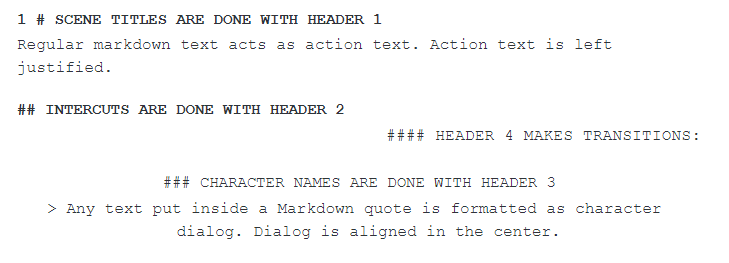
The Screenplay theme makes Obsidian look like a screenplay/script.
- Use
#for scene titles - Use
##for intercuts - Use
###for character names in dialog sections - Use
>for character dialog - Use
####for transition text
How to Install
- Download the repository ZIP below
- Unzip it and find the CSS snippet file
- Move the CSS file into your vault's
.obsidian/snippets/folder - Open Obsidian → Settings → Appearance → CSS Snippets → Enable it
Stats
Stars
44
Forks
6
Last updated 50mo ago