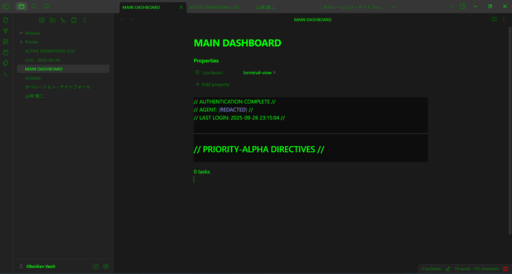
Spy Terminal Theme
Spy Terminal



A spy movie-style terminal theme for Obsidian and other Markdown editors
Experience coding and note-taking with the atmosphere of hacker movies
🎬 Theme Features
🖥️ Authentic Terminal Experience
- Monospace Fonts: Terminal-style fonts like SFMono-Regular, Roboto Mono, Ubuntu Mono
- 16px Font Size: Easy to read and comfortable for long work sessions
🌙 Dark Theme Design
- Dark Gray/Black Background: Eye-friendly dark background colors
- Three-tier Background: Primary, secondary, and tertiary backgrounds for hierarchy
💚 Classic Green Text
- Main Text: Vibrant green (#00ff00) for classic terminal feel
- Muted Text: Darker green (#008800) for hierarchy
- Error Text: Red (#ff0000) for important information
✨ Visual Effects
- Glow Effects: Glowing effects on links and task blocks for spy atmosphere
- Text Shadow: Subtle glowing effects on links
- Box Shadow: Green glow effects on task blocks
☑️ Interactive Elements
- Custom Checkboxes: Green checkboxes for task management
- Cyan Links: Links highlighted in cyan (#00ccff)
- Text Selection: Green semi-transparent text selection
📝 Code Blocks
- Dark Background: Very dark background (#0d0d0d) to make code stand out
- Green Text: Code text also in green for consistency
- Task Queries: Special styling for task blocks
📸 Screenshots
🎯 Main Dashboard
Integrated management of classified information - Authentication complete and high-priority directives

📝 Active Operations Log
Real-time mission status monitoring - Dataview queries for ongoing missions

👤 Person File
Target detailed information management - Detailed profile of Kenji Yamazaki

🎬 Spy Terminal Atmosphere
Immersive hacker movie experience - 3-pane display for integrated information management

📊 Graph View
Personnel relationships and operations visualization - Kenji Yamazaki centered relationships

🌟 Screenshot Features
- 🖥️ Authentic Terminal Experience: Classic terminal feel with monospace fonts and green text
- 📊 Data Visualization: Graph view for understanding personnel relationships and operations
- 📝 Real-time Monitoring: Task management and Dataview queries for mission tracking
- 👤 Information Management: Person files for systematic target information management
- 🎬 Immersive Experience: Enjoy coding and note-taking with spy movie atmosphere
🚀 Installation
For Obsidian
- Download the
theme.cssfile - Go to Obsidian Settings → Appearance → Themes → Custom CSS
- Copy and paste the file contents
- Enable the theme
For Other Markdown Editors
Place the CSS file in the appropriate location and load it as custom CSS in your editor's settings.
🎨 Customization
The theme can be customized using the following CSS variables:
--background-primary: #1a1a1a;    /* Main background color */
--text-normal: #00ff00;           /* Normal text color */
--link-color: #00ccff;            /* Link color */
--text-error: #ff0000;            /* Error text color */
💝 Support
If you like this theme, I would be very happy if you could support me with a cup of coffee!

Your support drives better theme development!
📄 License
MIT License
👨💻 Author
IchiroFukuda
- GitHub: @IchiroFukuda
- Buy Me a Coffee: buymeacoffee.com/saeli
⭐ Star this repository and enjoy the spy terminal coding experience! ⭐
How to Install
- Download the dashboard markdown file from GitHub
- Drop it into your vault (anywhere)
- Install the Homepage plugin and point it at the file
- Enable any listed CSS snippets for the intended look
Stats
Stars
5
Forks
0
License
MIT
Last updated 6mo ago