10 Stars
GitHubCSSAny theme
# MarkdownViewer.vim
Parse markdown to html and preview it, compatible with [GitHub flavored markdown](https://help.github.com/articles/github-flavored-markdown) and support [mermaid](http://knsv.github.io/mermaid/index.html).
## Install
1. Install `node.js` and `npm`.
1. Install `markdown-it` and `highlight.js` packages globally
- `npm install -g markdown-it`
- `npm install -g highlight.js`
1. Set `NODE_PATH` environment variable
- add `export NODE_PATH=/usr/lib/node_modules:$NODE_PATH` to `~/.bash_profile` or `~/.zshrc`
- See http://stackoverflow.com/questions/13465829/node-js-modules-path for more infomation
1. Copy the `after` folder to `~/.vim`.
1. Ensure you have the line `filetype plugin on` in your `.vimrc`.
1. Open a markdown file in `vim` and execute command `:MkdView`. Enjoy it!
## Usage
1. `:MkdView`, to preview markdown file. The default key map `<leader>v`
calls this command.
1. `:Mkd2html`, converting markdown file to html file and store html file.
## Screenshot

## Configuration
1. `g:mdv_theme` , the theme of html file. The available values are :
- `github`
- `github2`, the default
- `github3`
- `clear`
- `clearDark`
- `vue`
- `vue-dark`
1. `g:mdv_highlight_code`, to highlight code or not, default value is `1`. If
you want to prevent to highlight code, you can set it to `0` in `.vimrc`.
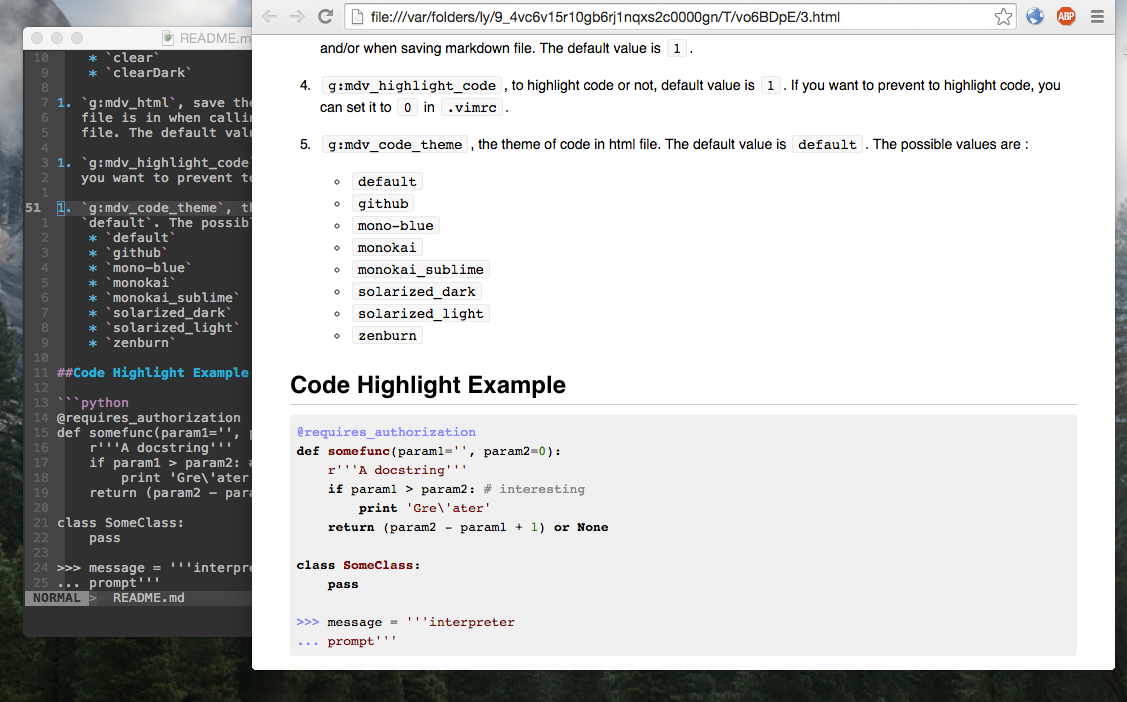
1. `g:mdv_code_theme`, the theme of code in html file, provided by [highlight.js](https://highlightjs.org/). The default value is `default`. The possible values are :
- `arta`
- `ascetic`
- `atelier-dune.dark`
- `atelier-dune.light`
- `atelier-forest.dark`
- `atelier-forest.light`
- `atelier-heath.dark`
- `atelier-heath.light`
- `atelier-lakeside.dark`
- `atelier-lakeside.light`
- `atelier-seaside.dark`
- `atelier-seaside.light`
- `codepen-embed`
- `color-brewer`
- `dark`
- `default`
- `docco`
- `far`
- `foundation`
- `github`
- `googlecode`
- `hybrid`
- `idea`
- `ir_black`
- `kimbie.dark`
- `kimbie.light`
- `magula`
- `mono-blue`
- `monokai`
- `monokai_sublime`
- `obsidian`
- `paraiso.dark`
- `paraiso.light`
- `railscasts`
- `rainbow`
- `solarized_dark`
- `solarized_light`
- `sunburst`
- `tomorrow-night-blue`
- `tomorrow-night-bright`
- `tomorrow-night-eighties`
- `tomorrow-night`
- `tomorrow`
- `vs`
- `xcode`
- `zenburn`
1. `g:mdv_mermaid_img`, The `mermaid` renders graph as `svg`. If you want to render the graph as image, you can set this option to `1`. The default value is `0`.
1. `g:mdv_config_pack`: a dictionary for pre-config for `:MkdView config_name` and `:Mkd2html config_name` commands
```viml
" this is a example
let g:mdv_config_pack = {
\ 'github': {
\ 'theme': 'github2',
\ 'highlight_code': 1,
\ 'code_theme': 'default',
\ 'mermaid_img': 0
\},
\ 'vue': {
\ 'theme': 'vue',
\ 'highlight_code': 1,
\ 'code_theme': 'default',
\ 'mermaid_img': 1
\}
\ }
```
## Change Log
- 2019-11-28
- MOD `:MkdView config_name`
- MOD `:Mkd2html config_name`
- ADD `:MarkdownView theme code_theme mermaid_img`
- ADD `:Markdown2html theme code_theme mermaid_img`
- ADD command complete for all commands
- 2019-11-21
- Use `markdown-it` insteadof `marked`
- see https://github.com/Microsoft/vscode/issues/4668
- see https://github.com/markedjs/marked/issues/724
- 2016-08-30
- Remove `:MkdMail` Command
- 2016-01-23
- bugfix
- 2016-01-21
- Add support for image and mermaid
- Remove `g:mdv_loaded`, `g:mdv_html`
- 2015-11-09
- bug fix for heading, see https://github.com/chjj/marked/issues/642
- 2015-05-29
- add `:MkdMail` command
- 2015-01-15
- add highlight for code
How to Install
- Download the CSS file below
- Move it to your vault's
.obsidian/snippets/folder - Open Obsidian → Settings → Appearance → CSS Snippets → Enable it
Stats
Stars
10
Forks
1
Last updated 16mo ago
Categories