Color Darker Obsidian Snippets
An Obsidian snippets' collection of page backgrounds and colors customization
Color darker | Obsidian CSS Snippets Repository

Obsidian CSS Snippets collection for pages backgrounds and colors customization
São Carlos, SP - Brazil
🎯 Purpose
Obsidian is a powerful tool with endless customization options. However, for new users, getting started with all the features it offers can be a bit overwhelming. One of the most compelling aspects of Obsidian is its customization capabilities, particularly through the use of CSS Snippets.
This repository aims to provide a wide variety of CSS Snippets to suit the needs of many users. Most of the CSS Snippets currently available online are often limited to a narrow range of colors or styles. The mission here is to break that cycle by offering a broad palette of colors and design options, ensuring that as many users as possible can find something that fits their personal taste and workflow.
🔁 Updates and Contributions
This is an ongoing project where I will continuously add new CSS Snippets as I learn and improve my own understanding of Obsidian. I welcome contributions from the community; your involvement will help increase the variety and diversity of the CSS Snippets available here, benefiting everyone who loves to customize their Obsidian experience.
Feel free to submit pull requests or create issues with your ideas, suggestions, or new snippets. Your contributions are invaluable in making this repository a vibrant resource for the entire Obsidian community.
📂 CSS Snippets
👁️ Check the available snippets
You can view the available CSS Snippets in the CSS Snippets Directory. This file contains a list of all the snippets, along with a brief description and preview of each one to help you decide which customization suits your needs. You can also download all of them, why not? 😉
💻 How to download and activate the snippets
To make the most out of these CSS Snippets, follow the step-by-step guide below to download and activate them in Obsidian:
- Download the snippets
- Go to the Releases section of this repository.
- Download the latest .zip file containing all the CSS snippets.
- Extract and move the snippets
- Open Obsidian and go to Settings (click on the gear icon at the bottom left).
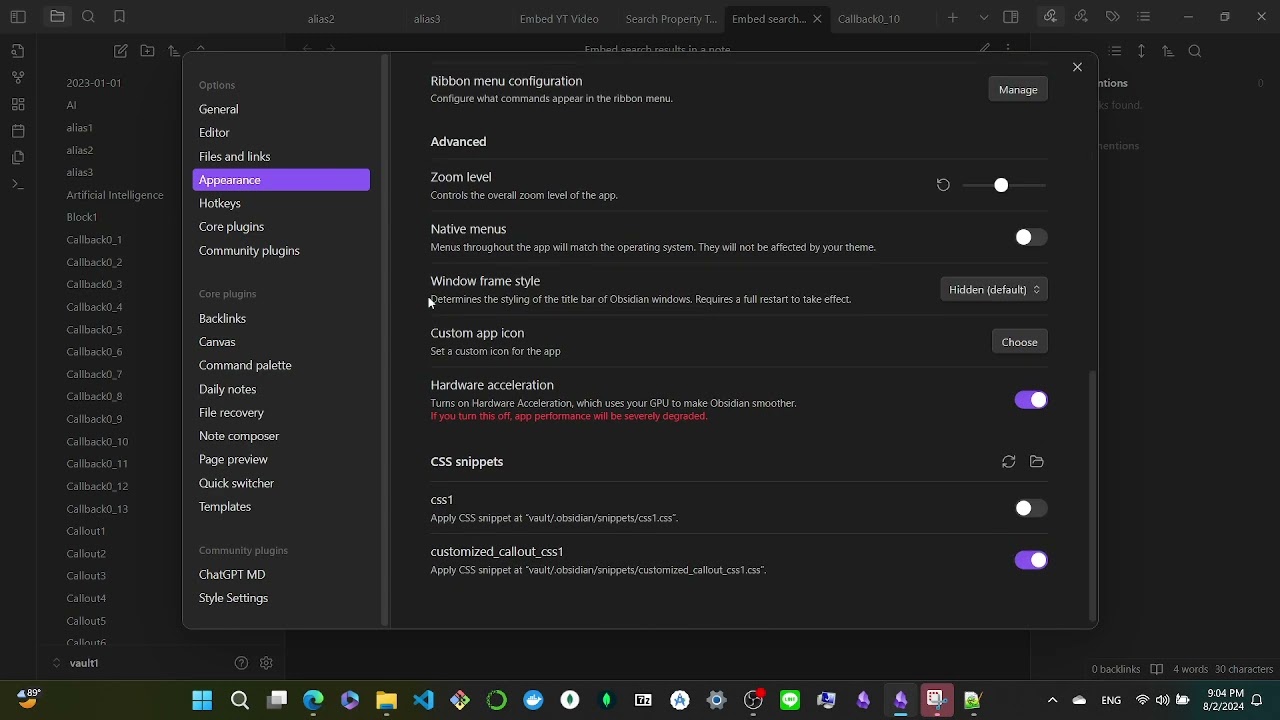
- Navigate to Appearance > CSS Snippets.
- Click on the Open Snippets Folder button. This will open the file explorer pointing to the correct folder where Obsidian looks for snippets.
- Extract the contents of the downloaded .zip file directly into this folder. This will ensure all the CSS files are placed in the correct location.
- Activate the snippets
- Return to the CSS Snippets section in Obsidian's settings.
- Click on the Refresh button
- You should see a list of all the snippets you just added.
- Toggle the switch next to each snippet you want to use to make them available.
If you still facing problems trying to enable css snippets in Obsidian, check this video I found in the web (or click the image above):
✅ Applying the snippets
To apply the snippets, you must use the appropriate cssclasses in the properties of your notes. Each snippet has its own cssclasses that must be added to the frontmatter for the snippet's styles to take effect.
The cssclasses required for each snippet are listed in the CSS Snippets Directory. Make sure to check this file for the correct cssclasses associated with each snippet. Here's how to apply them:
- Open the note where you want to apply a snippet.
- At the very top of the note, add or edit the YAML frontmatter to include the cssclasses property.
- Now, the styles associated with the snippet should be applied.
💡 Credits and Inspirations
This repository is a collective effort inspired by many talented members of the Obsidian community and beyond. Below is a list of sources, tools, and individuals whose work has directly or indirectly influenced the creation of these CSS Snippets:
🙏 Special Thanks
I would like to extend a special thanks to Arthur (known as coronelvermelho on Discord) for his invaluable contributions and ideas throughout the creation of this project. Many of the concepts and inspiration came from our conversations.
Arthur
(coronelvermelho on Discord)
How to Install
- Download the repository ZIP below
- Unzip it and find the CSS snippet file
- Move the CSS file into your vault's
.obsidian/snippets/folder - Open Obsidian → Settings → Appearance → CSS Snippets → Enable it
Stats
Stars
21
Forks
0
Last updated 24mo ago