OptiVault
Zero-Dependency AST-Driven Context Compiler and MCP Server for Claude Code
OptiVault solves the "token bloat" problem with the most direct approach: no LLMs, no summarization, no external API calls. It extracts your repo's structure—function signatures, arrow functions, class methods, dependencies—using pure AST parsing, writes a compressed shadow vault, and exposes it via the MCP protocol.
Claude Code gets a 4-tool semantic router to traverse your codebase hierarchically, consuming ~50 tokens per file instead of ~1,000. As soon as Claude is done writing code, a single sync_file_context call keeps the vault perfectly up to date.
Benchmark Results
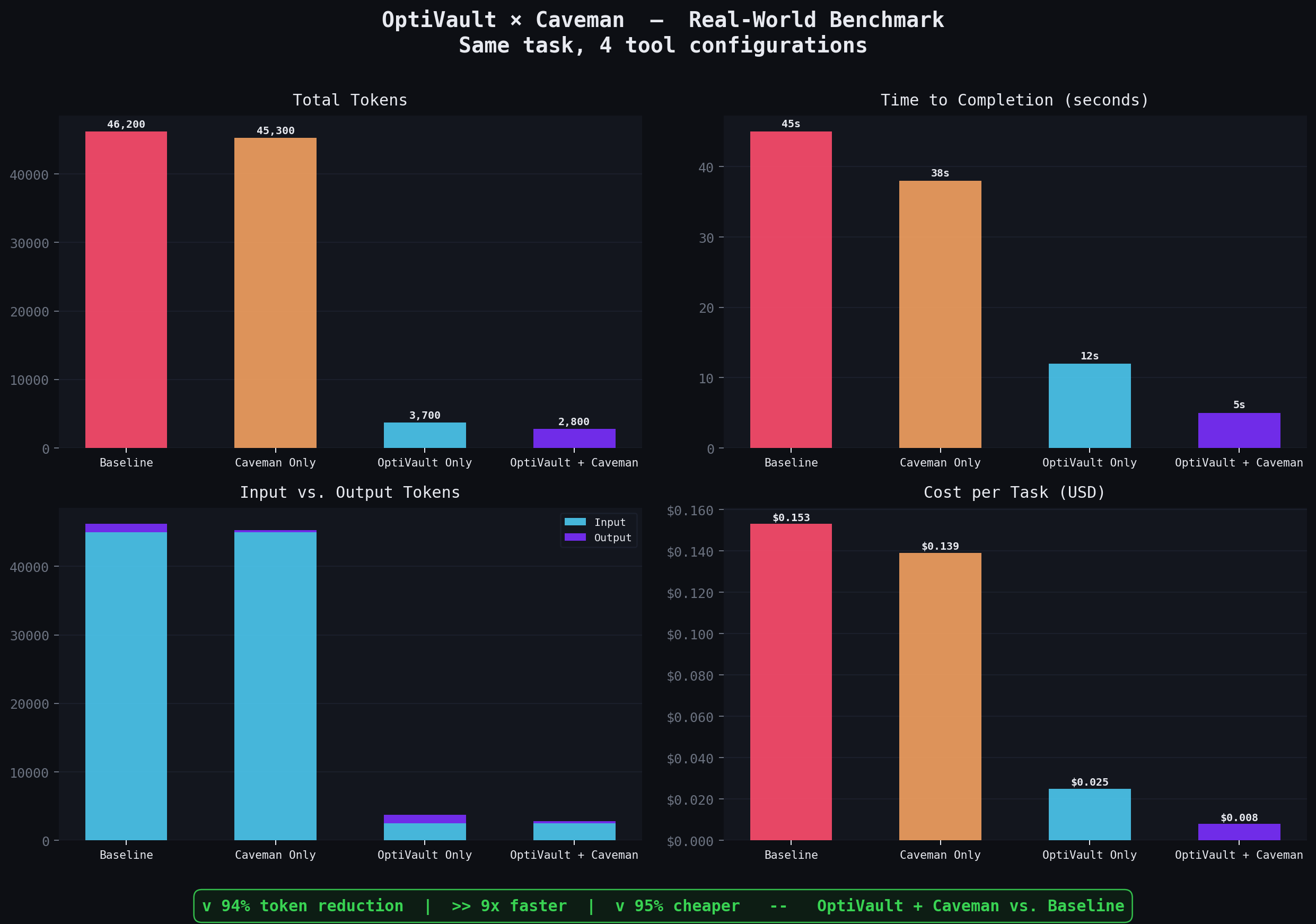
Same task. Same codebase. Four tool configurations. Measured with Claude Code's /cost command.

| Scenario | Input Tokens | Output Tokens | Total Tokens | Time | Cost |
|---|---|---|---|---|---|
| Baseline (vanilla Claude) | 45,000 | 1,200 | 46,200 | 45s | $0.153 |
| Caveman Only | 45,000 | 300 | 45,300 | 38s | $0.139 |
| OptiVault Only | 2,500 | 1,200 | 3,700 | 12s | $0.025 |
| OptiVault + Caveman | 2,500 | 300 | 2,800 | 5s | $0.008 |
v 94% token reduction · 9× faster · 95% cheaper vs. a vanilla Claude Code session.
Numbers above are representative mock data. Run
python benchmark/plot_results.pyafter filling inbenchmark/data.csvwith your own/costreadings to regenerate the charts.See
benchmark/EXPERIMENT_GUIDE.mdfor the exact reproduction steps.
Why OptiVault
| Problem | OptiVault's Solution |
|---|---|
| Claude reads entire files to understand structure | read_file_skeleton returns deps + signatures in ~50 tokens |
| Context window fills with irrelevant code | read_function_code fetches only the function Claude needs |
| Shadow context goes stale when Claude writes code | sync_file_context re-indexes a single file in ~20ms |
| Claude doesn't know OptiVault exists | optivault init generates CLAUDE.md enforcing the protocol |
Re-running init on a large project is slow | mtime-based caching skips unchanged files entirely |
Features
- Zero external dependencies — no Ollama, no LLMs, no API calls. Pure TypeScript.
- Blazing fast — scans 1,000 files in ~2–3 seconds; incremental sync in ~20ms.
- Full arrow function support —
export const fn = (x: string) => {}extracts asfn(x: string), not justfn. - 4-tool MCP semantic router — bird's-eye map → file skeleton → function body → live re-sync.
- Self-enforcing protocol — auto-generated
CLAUDE.mdtells Claude exactly how to use OptiVault. - Idempotent init — mtime-checked; re-running init on a 5,000-file repo takes milliseconds.
- Plugin architecture — add Go, Rust, or Java by implementing a single interface.
- Obsidian-compatible vault — default dir
_optivaultis visible in Obsidian natively (no leading dot). - Auto-migration — detects and renames legacy
.optivaultdirectories automatically; zero data loss. - Configurable vault name — drop an
optivault.jsonin your project root to rename the vault dir. - 99 passing tests — full coverage across extraction, fallbacks, MCP tools, caching, and migration.
Install
Prerequisites
- Node.js ≥ 20 (download)
- npm (comes with Node.js)
From Source
git clone https://github.com/your-username/optivault
cd optivault
npm install
npm run build
npm link
npm link makes the optivault binary available globally:
optivault --help
Quickstart
# 1. Index your project (creates _optivault/, CLAUDE.md, and .gitignore entry)
optivault init ~/my-project

# 2. Register with Claude Code
claude mcp add optivault optivault -- mcp \
  --vault ~/my-project/_optivault \
  --source ~/my-project

# 3. Open Claude Code in that project — it will read CLAUDE.md and follow the protocol automatically
How It Works
1. Index (optivault init)
optivault init ~/my-project
What happens:
- Checks for a legacy
.optivaultdirectory and renames it automatically (zero data loss) - Reads
optivault.jsonfor a custom vault dir name, defaults to_optivault - Recursively walks the project for
.ts,.tsx,.js,.mjs,.pyfiles - Skips
node_modules,.git,dist, and the vault dir itself - Checks mtime — only re-parses files newer than their vault note (fully idempotent)
- Extracts function signatures, arrow functions, class methods, imports
- Writes
.mdshadow notes to~/my-project/_optivault/ - Generates
_RepoMap.md— master index of the entire repo - Creates (or patches)
CLAUDE.mdwith the OptiVault protocol directive - Adds the vault dir to
.gitignoreautomatically
Example vault note (src/auth.ts.md):
---
tgt: src/auth.ts
dep: [[database]], [[crypto]]
exp: [verifyToken(token: string), hashPwd(plain: string), TokenService]
---
## Signatures
- `verifyToken(token: string)`
- `hashPwd(plain: string)`
- `TokenService`
Example RepoMap (_RepoMap.md):
# RepoMap

- [[src/auth]] — exports: verifyToken(token: string), hashPwd(plain: string) — deps: database, crypto
- [[src/db/pool]] — exports: getConnection(), closePool() — deps: pg, config
- [[src/middleware/rate-limit]] — exports: rateLimiter(opts: RateLimitOpts) — deps: express, redis
2. Watch (optivault watch)
optivault watch ~/my-project
Stays running. Re-indexes files the moment they're saved. Use this during active development instead of the MCP sync_file_context tool.
3. MCP Server (optivault mcp)
optivault mcp --vault ~/my-project/_optivault --source ~/my-project
Starts the MCP server. Claude Code connects automatically once registered.
The 4 MCP Tools
read_repo_map
Returns the full _RepoMap.md — a bird's-eye view of every file, its exports, and its dependencies.
Claude: "What's the architecture of this repo?"
→ read_repo_map()
← # RepoMap
  - [[src/auth]] — exports: verifyToken(...), hashPwd(...) — deps: database, crypto
  - [[src/db/pool]] — exports: getConnection() — deps: pg
  ...
When to use: Always call this first. It costs ~200 tokens and gives complete structural context.
read_file_skeleton
Returns the compressed shadow note for a specific file: deps + all exported signatures.
Claude: "What does src/auth.ts export?"
→ read_file_skeleton(filename: "src/auth.ts")
← ---
  tgt: src/auth.ts
  dep: [[database]], [[crypto]]
  exp: [verifyToken(token: string), hashPwd(plain: string)]
  ---
  ## Signatures
  - `verifyToken(token: string)`
  - `hashPwd(plain: string)`
When to use: After read_repo_map identifies the relevant file, before reading the full source.
read_function_code
Extracts just the implementation of a named function — standard functions, arrow functions, class methods, async functions, generic functions.
Claude: "I need to understand how verifyToken works"
→ read_function_code(filename: "src/auth.ts", functionName: "verifyToken")
← export function verifyToken(token: string): boolean {
    const decoded = jwt.verify(token, process.env.SECRET);
    return decoded !== null;
  }
When to use: When you need the actual logic, not just the signature. Fetches ~20 lines instead of the entire 500-line file.
Requires --source to be set on the MCP server.
sync_file_context
The key to a stale-free vault. Call this immediately after writing or modifying any source file. It re-parses the single file, overwrites its vault note, and patches its entry in _RepoMap.md — all in ~20ms.
Claude: [writes new function calculateTax to src/billing.ts]
→ sync_file_context(filename: "src/billing.ts")
← "Successfully synced shadow context for src/billing.ts."
CLAUDE.md makes this mandatory — Claude will call it autonomously after every file write.
Requires --source to be set on the MCP server.
CLAUDE.md — The Self-Enforcing Protocol
Every time optivault init runs, it checks for CLAUDE.md in the project root:
- Not present → creates it
- Present, no OptiVault section → appends the protocol block (original content preserved)
- Already patched → silent no-op
Generated content:
<!-- optivault-protocol -->
# OptiVault Protocol Active
This repository uses OptiVault for AST-compressed context.
Shadow vault: `_optivault/`

**Rules for AI Assistants:**
1. NEVER use `cat`, `grep`, or standard file reads to understand the codebase initially.
2. ALWAYS start by calling the `read_repo_map` MCP tool.
3. Use `read_file_skeleton` to view a file's dependencies and exported signatures.
4. Use `read_function_code` if you need to analyze or modify a specific function body.
5. **CRITICAL:** Whenever you modify a file or write new code, you MUST immediately call the
   `sync_file_context` MCP tool on that file to keep the shadow vault up to date.
The Shadow vault: line reflects whatever vaultDir is configured (default: _optivault).
Claude Code reads CLAUDE.md automatically at the start of every session. No setup required after the first init.
Register with Claude Code
Via CLI (recommended)
claude mcp add optivault optivault -- mcp \
  --vault /path/to/project/_optivault \
  --source /path/to/project
Via settings file
Add to ~/.claude.json (or your project-local Claude settings):
{
  "mcpServers": {
    "optivault": {
      "type": "stdio",
      "command": "optivault",
      "args": [
        "mcp",
        "--vault", "/path/to/project/_optivault",
        "--source", "/path/to/project"
      ]
    }
  }
}
Multiple Projects
Register a separate MCP server per project with unique names:
claude mcp add optivault-api optivault -- mcp \
  --vault ~/projects/api/_optivault --source ~/projects/api

claude mcp add optivault-frontend optivault -- mcp \
  --vault ~/projects/frontend/_optivault --source ~/projects/frontend
CLI Reference
optivault init [dir] [options]
Index a project. Safe to re-run — unchanged files are skipped.
optivault init ~/my-project
optivault init ~/my-project --output ~/my-project/_optivault
| Option | Default | Description |
|---|---|---|
-o, --output <path> | from optivault.json, else _optivault | Output directory for vault notes |
optivault watch [dir] [options]
Watch for file changes and update incrementally. Press Ctrl+C to stop.
optivault watch ~/my-project
| Option | Default | Description |
|---|---|---|
-o, --output <path> | from optivault.json, else _optivault | Output directory for vault notes |
optivault mcp [options]
Start the MCP server (4 tools).
optivault mcp --vault ~/my-project/_optivault --source ~/my-project
| Option | Default | Description |
|---|---|---|
-o, --vault <path> | from optivault.json, else _optivault | Vault directory to serve |
-s, --source <path> | — | Source root (required for read_function_code and sync_file_context) |
Architecture
src/
├── config.ts               # getConfig — reads optivault.json, returns OptiVaultConfig
├── ast/
│   ├── plugins/
│   │   ├── typescript.ts   # .ts .tsx .js .mjs .jsx — imports, exports, arrow fns, methods
│   │   ├── python.ts       # .py — top-level defs, classes, imports
│   │   └── index.ts        # Auto-registers all built-in plugins
│   ├── extractor.ts        # Public extractDeps / extractExports API
│   ├── function-extractor.ts  # extractFunctionCode — brace-matched body extraction
│   ├── parser.ts           # parseFile — reads file, dispatches to plugin
│   ├── registry.ts         # Plugin registry — keyed by file extension
│   └── types.ts            # LanguagePlugin interface
├── compression/
│   └── formatter.ts        # formatVaultNote — ParseResult → .md frontmatter
├── vault/
│   ├── init.ts             # walkDir, runInit, migrateLegacyVault, generateClaudeMd,
│   │                       #   ensureGitignored, VaultRegistry
│   └── watch.ts            # chokidar watcher, incremental re-index
├── mcp/
│   └── server.ts           # McpServer with 4 tools
└── cli/
    └── index.ts            # Commander CLI — init / watch / mcp (all consume getConfig)
Plugin Interface
interface LanguagePlugin {
  extensions: string[];
  extractDeps(source: string): string[];
  extractExports(source: string): string[];
  extractFunctionCode?(source: string, functionName: string): string | null;
}
Adding a New Language
// src/ast/plugins/go.ts
import type { LanguagePlugin } from '../types.js';

export const goPlugin: LanguagePlugin = {
  extensions: ['.go'],
  extractDeps(source) {
    // Extract import paths → ["fmt", "os", "github.com/user/pkg"]
    return [];
  },
  extractExports(source) {
    // Extract exported func signatures → ["main()", "InitDB(): error"]
    return [];
  },
  extractFunctionCode(source, functionName) {
    // Return the full function body or null
    return null;
  },
};
Register it in src/ast/plugins/index.ts:
import { goPlugin } from './go.js';
registerPlugin(goPlugin);
Done. Zero changes to core code.
Performance
| Operation | Time |
|---|---|
| Initial scan — 1,000 files | ~2–3 seconds |
| Idempotent re-scan (all unchanged) | < 100ms |
sync_file_context (single file) | ~20ms |
| Incremental watch (single file save) | ~100–200ms |
| Token cost per file (skeleton) | ~50 tokens |
| Token savings vs. full file read | ~95% |
Configuration
Create an optivault.json file in your project root to override the vault directory name:
{
  "vaultDir": "_my_custom_vault"
}
Resolution order (highest priority first):
--output/--vaultCLI flagvaultDirinoptivault.json- Built-in default:
_optivault
The config file is read by init, watch, and mcp commands automatically — no flags needed once it exists.
Use with Obsidian
The _optivault/ directory is a fully functional Obsidian vault, visible natively without any plugins:
- Open Obsidian → Open folder as vault → select
_optivault/ - Every source file is a note, wikilinked via its imports
- Open Graph View to visualize your entire codebase as a dependency graph
Note: The previous
.optivaultdefault used a leading dot, which Obsidian silently ignores. The new default_optivaultis always visible.
Testing
npm test            # Run full suite (99 tests)
npm run test:watch  # Continuous mode during development
npm run build       # TypeScript compilation check
npm run lint        # Type check without emit
Test coverage includes:
- TypeScript dep/export extraction — named, default, namespace, dynamic imports
- Arrow function signature extraction (
export const fn = (x: T) => {}) - Python dep/export extraction
extractFunctionCodefor TS standard functions, arrow functions, class methods, Python defsgetConfig— missing file, malformed JSON, empty vaultDir, whitespace trimmingrunInit— graceful fallback on parse errors, empty projects, mtime cachinggenerateClaudeMd— create, append, idempotent no-op, custom vault dir nameensureGitignored— create, append, idempotent no-opmigrateLegacyVault— rename, no legacy dir, identical paths, both dirs exist guard- All 4 MCP tools — registration, happy path, ENOENT handling,
sync_file_contextpatch/insert/replace logic
FAQ
Why regex instead of tree-sitter? Regex extraction requires zero native build steps, works in every environment, and is fast enough for all practical repo sizes. Individual plugins can be upgraded to tree-sitter incrementally without touching the core.
Does read_function_code handle generics?
Yes. function fn<T = unknown>(x: T) is matched correctly. Brace-depth tracking handles nested generics, strings, and template literals.
What if a file can't be parsed?
init logs a warning and skips it. The rest of the index is unaffected and the process does not crash.
What if CLAUDE.md already exists?
OptiVault appends only if the <!-- optivault-protocol --> marker is absent. Your existing content is never touched.
Can I run this offline? Yes. 100% offline. No network calls, no API keys, no LLM backends.
Does sync_file_context rebuild the entire RepoMap?
No. It reads the existing _RepoMap.md, replaces or inserts just the one changed line, and writes it back. It's an O(lines in map) patch, not an O(files in repo) rebuild.
What languages are supported? TypeScript, TSX, JavaScript, MJS, JSX, and Python out of the box. Any language can be added via the plugin interface.
I have an old .optivault directory. Do I need to rename it manually?
No. The first time you run optivault init (or watch or mcp) after upgrading, OptiVault detects the legacy .optivault directory and renames it to _optivault automatically. No data is lost.
Why _optivault instead of .optivault?
Obsidian natively ignores any directory whose name starts with a dot. The _optivault default is fully visible in Obsidian's file explorer and Graph View without any plugins or workarounds.
Does OptiVault touch .gitignore?
Yes — optivault init appends the vault dir name to .gitignore if it isn't already there. It creates .gitignore if the file doesn't exist. It is always a no-op if the entry is already present.
License
MIT
Built for Claude Code. Built for speed. Built for clarity.
How to Install
- Download the ZIP or clone the repository
- Open the folder as a vault in Obsidian (File → Open Vault)
- Obsidian will prompt you to install required plugins
Stats
Stars
3
Forks
2
Last updated 1d ago
Tags