Dataview Cards
A powerful script for displaying customizable cards in Obsidian, built with DataviewJS. Fully compatible with any Obsidian theme.
English | Русский
🎴 Universal Dataview Cards
A powerful script for displaying customizable cards in Obsidian, built with DataviewJS. Includes support for sections, filtering, sorting, embedded media, progress bars, and more.
Fully compatible with any Obsidian theme.



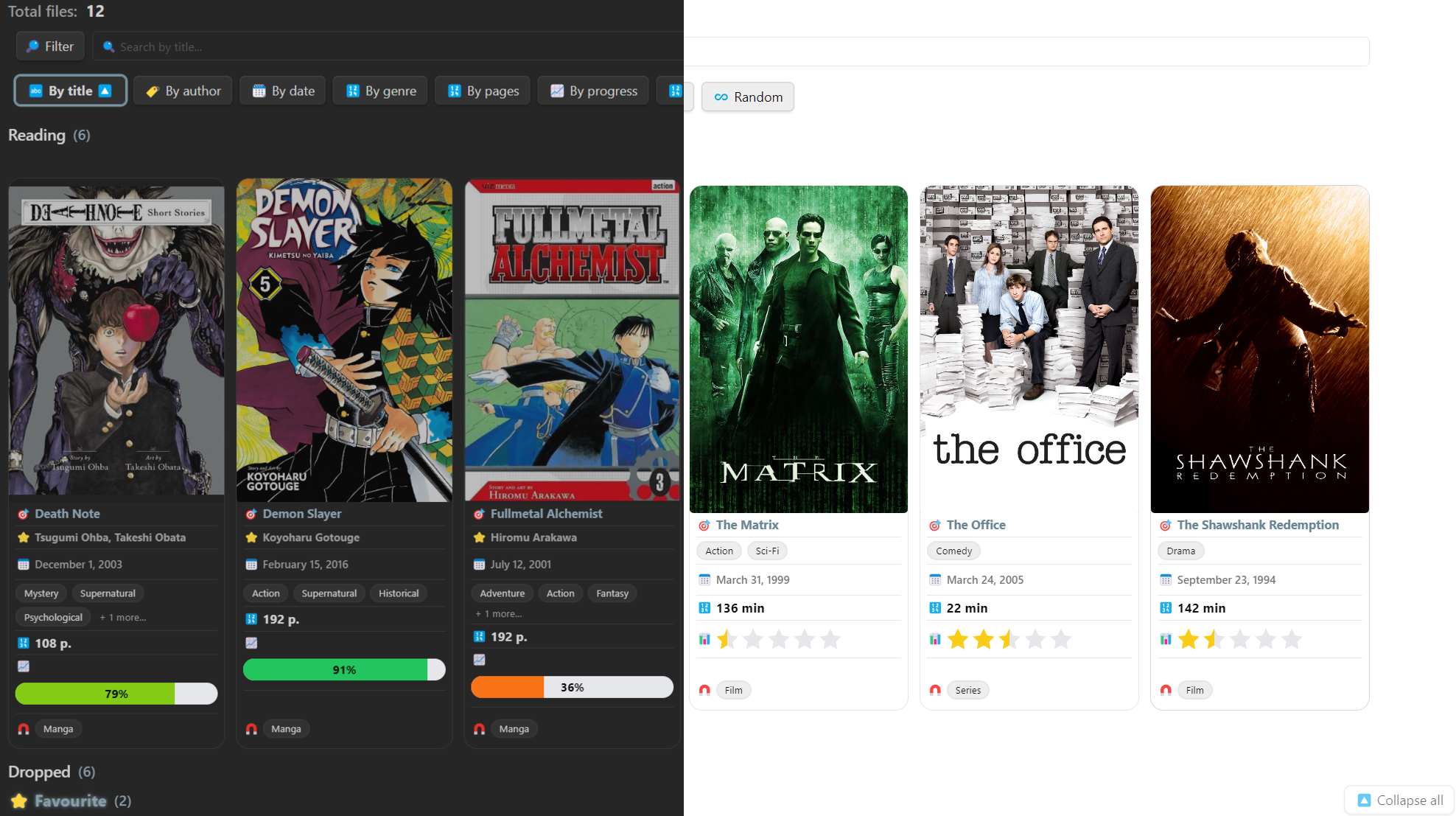
📸 Interface Example
A simple example of an interface with books and movies

✨ Script Features
| Feature | Description |
|---|---|
| 🎴 Card layout | Visual representation of notes as individual cards |
| 🔍 Filtering & sorting | By type, folder, tags, or custom fields |
| 🧠 Section logic | Automatically sort cards into different visual sections |
| 🎨 Customization | Emojis, colors, order, custom CSS classes |
| 📈 Progress, rating, icons | Display metrics visually right inside each card |
| 🖼️ Image slider | Switchable gallery inside the card |
| 🔊 Embedded media | Supports MP3, MP4, OGG, and more |
| 🧩 Extensibility | Flexible config for any structure or use case |
| 💾 Persistent settings | Configuration is saved between Obsidian sessions |
🎥 Video Demo

▶️ Click the image to watch a video demonstration
Script Capabilities
⚙️ What the Script Can Do:
The script transforms YAML entries (metadata) in Obsidian into beautiful, interactive cards with filters, sections, and visual components.
✨ What Can You Use This Script For?
🎓 Knowledge Base
Group content by topic, track progress, add tags and ratings.
📺 Movie & TV Show Catalog
Each card represents a movie or series: cover, title, genres, rating, video, and even soundtrack.
📚 Study Plans
Visualize completed materials, progress in percentages, grades, and deadlines.
🧠 Idea and Note Collections
Use filters and sections to track the status of each idea.
No matter what you want to track — books, movies, tasks, or people — everything will be clean, structured, and interactive.
📦 Required Plugins & Themes
To ensure proper functionality, it's recommended to install the following components:
- 🔌
Dataview— Required. Powers the data logic behind the cards. - 🎛
Style Settings(optional) — For advanced visual customization, especially with the Minimal theme. - 🎨
Minimal Theme(optional) — A fully compatible theme for the best visual experience.
⚠️ The script won't work without
Dataview. The other components are optional, but recommended for full styling support.
🚀 How to Start Using the Script
Choose one of the three options to get started:
🔹 Option 1: Download the Release Archive
📦 Download ready-to-use archive (v1.0.0)
🔹 Option 2: Manual Download from GitHub
-
Go to the repository:
👉 https://github.com/2PleXXX/obsidian-dataview-cards -
Click the green "Code" button and select "Download ZIP".
🔹 Option 3: Clone via Git
git clone https://github.com/2PleXXX/obsidian-dataview-cards.git
✅ After Downloading:
-
Unpack the archive (if you downloaded ZIP/RAR).
-
In Obsidian, open the extracted Obsidian-Vault folder as a new Vault.
-
Open the homepage (HUB) inside the vault.
👉 I recommend starting with the note "Starting Point".
ℹ️ Disclaimer
The appearance shown in demo images and videos may differ slightly from the current version of the script, as updates may be released over time.
How to Install
- Download the ZIP or clone the repository
- Open the folder as a vault in Obsidian (File → Open Vault)
- Obsidian will prompt you to install required plugins
Stats
Stars
12
Forks
0
License
MIT
Last updated 8mo ago
Tags